topics:
i wanted to replicate my analog systems as much as possible – meaning dedicated space for my journal, plans, project notes, learning and thinking notes, and permanent files.
+ inbox
01 - JOURNAL time-based entries → daily notes, reflections, meetings, appointments, etc.
02 - PLANNER routines → budget, cleaning and maintenance trackers, yearly calendar.
03 - BINDER active projects → brainstorms, drafts, mindmaps.
04 - NOTEBOOK things i’m learning and thinking about → atomic notes, source notes, quotes and highlights → my most well-developed space <3 see the notes post
05 - LIBRARY permanent reference → people and places, collections of things like recipes, input, and output.
x archive
[!caution] this section is out of date switched back to links from tags; using
categoriesandtypesfor “nesting”.
this is always a work in progress. i mostly riff on kepano’s system , but instead of using links for categories, i’m using nested tags by type and by area.
for example:
- #people
	- #people/contacts
		- #people/contacts/family
		- #people/contacts/friendsNeighbors
		- #people/contacts/xxxxx
		- #people/contacts/xxxxx
	- #people/publicFigures
		- #people/publicFigures/expertsSources
		- #people/publicFigures/celebritiesPoliticians
		- #people/publicFigures/artists


...

- #home
	- #home/renting
		- #home/renting/xxx
		- #home/renting/xxx
	- #home/maintenance
	- #home/gardening
	- #home/recipes
		- #home/recipes/salads
i don’t love using tags and they seem to slow down my vault more than links, but i’m able to more easily create base views like this:
[!note]- base view 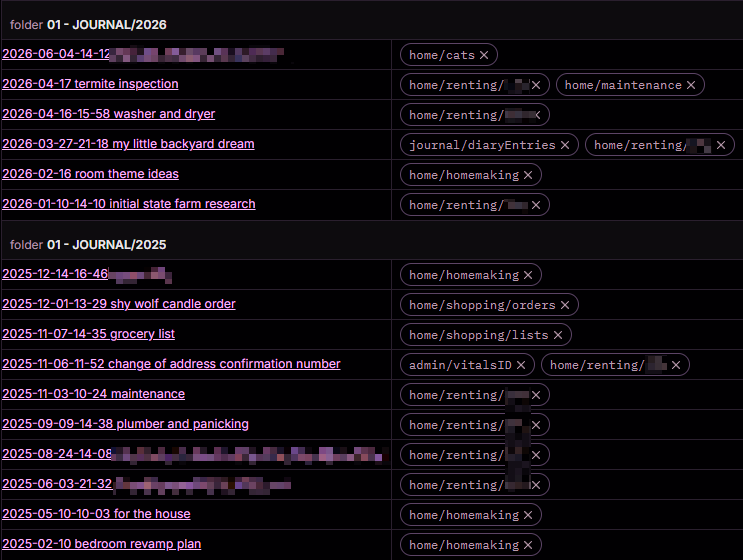
…where i can see everything related to #home but can also drill down to, e.g, a specific address we’ve lived at via #home/renting/xxx.
.njki’m currently thinking about tags like the ““gravity”” of a note…
also tags for input, identities, and output… not sold on output wishlist
{0.3b} how i manage projects and tasks 2026-03-07-10-40 how i manage my journals in obsidian